
Microsoft 365 User MFA Reports
Specmasoft’s Microsoft 365 User MFA Reports empowers your organization with deep insights into multi factor authentication across your Microsoft 365 environment. While the native Admin Center and PowerShell provide basic MFA data, interpreting and exporting details—especially for specific user sets—can be challenging and inefficient.
Our desktop based reporting tool brings the power of Microsoft Graph into a user friendly interface. Instantly generate comprehensive MFA reports—covering registered methods, default preferences, contact information, and per user MFA status—for all users, without the need for PowerShell scripting.
Key Insights Provided
- Registered MFA Methods: View which authentication methods each user has registered, such as authenticator apps, phone, or email.
- Preferred MFA Method: See each user’s default method (e.g., Authenticator app) to verify enforced security standards.
- MFA Phone Number & Email: Access contact details tied to MFA setups to help with support and emergency resets.
- Per-User MFA Status: Quickly identify whether MFA is enabled, enforced, or disabled for every individual user.
- Complete MFA Overview: Monitor registration methods, defaults, and enforcement for all users.
All Users MFA Registration Details
Lists each user’s MFA registration details, including MFA Registered Status, MFA Capable Status, Registered Methods, Default MFA Method, SSPR Enabled, SSPR Registration Status, and more.

User MFA Registered Methods
Provides a detailed list of selected users’ registered multi-factor authentication (MFA) methods, including authenticator app, phone, email, and security key. This report also displays the registered phone numbers and email addresses associated with each method.

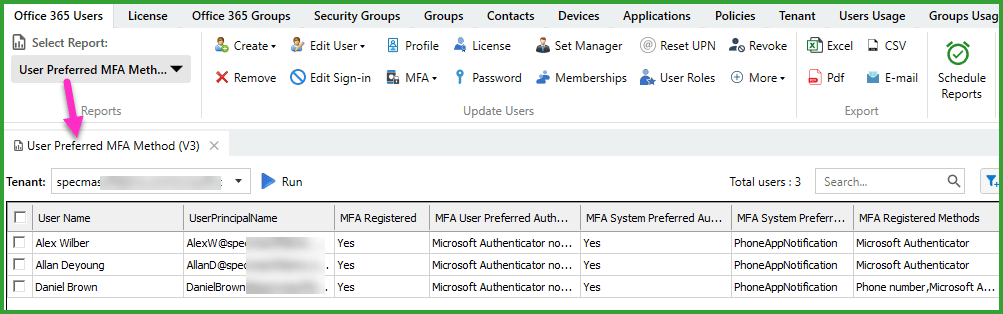
User Preferred MFA Method
Displays the default MFA method set by each user or enforced through policy.
User MFA Phone Number & Email
Shows the registered MFA phone number and MFA email address for each selected user.

All Users: Per-user MFA Status
Lists the per-user MFA state for each user, indicating whether MFA is Enabled, Enforced, or Disabled.

Boost Operational Efficiency
- Audit Readiness – Proactively identify users lacking MFA or not following policy.
- Simplify Support – Quickly locate MFA contact info (phone number and email address) for password resets or recovery.
- Security Enforcement – Ensure all users are following the right MFA methods and workflows.
- Export Capability – Download CSV or Excel reports for internal compliance or board reporting.